

Distributed teams are now the norm, and the help desk is paying for it. About 34.6 million Americans teleworked in August 2025, a 22.1% telework rate, according to the Bureau of Labor Statistics. Supporting that workforce raises problems an in-office desk never faced: hybrid schedules, personal devices, and time zones that refuse to line up.
These issues quietly drain budgets, stall projects, and open the security gaps attackers prize. The encouraging part is that every challenge here has a proven fix your team can begin this quarter. Below are the seven that matter most, along with the exact moves that resolve them.
Key Takeaways
• Security is the top pain point, and weak authentication on exposed endpoints drives a large share of ransomware incidents.
• Latency and cross-platform gaps come down to vendor choice, not endless network spending.
• Recorded sessions and audit logs convert routine support work into evidence auditors accept.
• Patch automation closes the window between a published vulnerability and an actual fix.
• Consolidating onto one governed platform shrinks the attack surface and trims administrative overhead.
Why Remote Desktop Support Problems Cost More Than They Appear
A frozen session or a slow login looks minor on its own. Scale it across an entire workforce and the math turns ugly fast.
It helps to know what good looks like before you compare products. For teams weighing their options, a clear primer on how remote desktop support works explains where attended, unattended, and on-demand assistance fit.
The ITIC 2024 Hourly Cost of Downtime Survey found that one hour of downtime now tops $300,000 for over 90% of mid-size and large enterprises. Each avoidable support delay carves a slice from that figure.
Security sits on the other side of the ledger. Verizon’s 2025 Data Breach Investigations Report found ransomware present in 88% of breaches at small and medium businesses, and exposed remote desktop protocol remains a leading entry route for it, per federal ransomware prevention guidance.
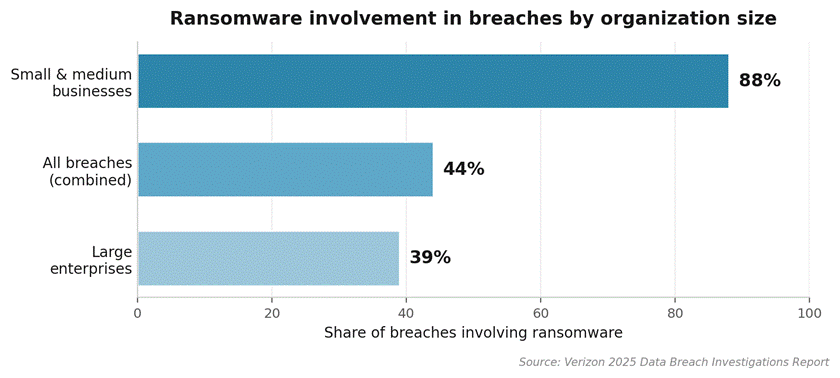
Figure 1: Ransomware now appears in the majority of breaches, and the burden lands hardest on smaller firms.
The Seven Challenges and How to Solve Each One
Use the table below as a quick map. Every challenge gets unpacked in the section that follows it.
| Challenge | Symptom your team sees | Quick fix |
| Credential exposure | Brute-force attempts, repeated lockouts | Enforce MFA and stop direct RDP exposure |
| Latency and lag | Jittery sessions, frozen screens | Adopt adaptive streaming, prioritize traffic |
| Cross-platform gaps | Mac and Linux users blocked | Pick tools with native agents on every OS |
| Authentication errors | Connection failures, expired sessions | Sync the identity provider, clear stale accounts |
| Outdated agents | Open security holes, missed updates | Automate updates with endpoint management |
| Compliance gaps | No record of who did what, and when | Switch on session logging and recording |
| Tool sprawl | Each team runs a different platform | Consolidate onto one governed system |
1. Security and Credential Exposure
Direct RDP exposure stays one of the most dependable footholds for attackers. Brute-force tools cycle through stolen credentials at scale, while lockout policies often sit unconfigured on default Windows builds.
Solution: never expose RDP to the open internet. Place every session behind multi-factor authentication, switch on recording, and adopt a verify-first access model. A practical overview of zero trust network access shows how identity-aware policies replace the implicit trust that flat office VPNs once assumed.
| Security warning: If your help desk still leaves port 3389 reachable from any IP address, close that exposure before anything else on this list. The blast radius from a single stolen credential pair is enormous. |
2. Latency and Session Quality
A jittery session does more than irritate. It nudges technicians toward shortcuts, stretches ticket times, and frustrates users enough to file complaints that loop straight back to IT.
Solution: choose a vendor whose adaptive streaming responds to live network conditions, then prioritize support traffic with Quality of Service rules. For regions plagued by lag, run synthetic tests and document the worst case before signing a service level agreement. Physical infrastructure counts too, so if office connectivity is the bottleneck, review your network cabling setup before blaming the software.
3. Cross-Platform Compatibility Gaps
Modern workforces are rarely single-OS shops. A typical mid-size company runs Windows, macOS, Linux, iOS, and Android in steady rotation, and software built for one platform turns the help desk into triage rather than resolution.
Solution: insist on full native agents for every operating system in use, not browser-only workarounds. Mobile tends to be the weak link, so confirm Android and iOS coverage before you commit, because Apple’s platform rules limit what any vendor can deliver.
4. User Authentication Errors
Expired tokens, stale group memberships, and out-of-sync identity providers create a steady drip of failed connections. Each looks trivial in isolation. Together they burn hours and chip away at trust in the tool.
Solution: integrate the support platform with a central identity provider, prune unused accounts on a set schedule, and write a short runbook for users when a session fails. Clear steps keep small tickets from snowballing into escalations. Routine Windows faults, such as a directory name is invalid error, often trace back to the same identity and permissions hygiene.
5. Patch and Update Lag
Endpoints running outdated agents are doubly exposed. The vulnerability is public, attackers already know the surface, and the support team is the one still running the legacy build.
Solution: turn on automated patch management at the platform level so updates flow without a manual push. Pair that with a monthly coverage check, and keep a dashboard that flags any endpoint stuck on an old agent beyond 14 days.
| Pro tip: Attackers frequently move within hours of a public CVE disclosure. A live patch dashboard that surfaces stale agents lets you act in that same window rather than during the next audit. |
6. Audit and Compliance Gaps
Sectors from healthcare to finance demand detailed records of who reached which device, when, and what they changed. Without that trail, an audit becomes a forensic dig.
Solution: enable session recording and audit logging by default, and treat both as table stakes rather than premium extras. Periodic spot reviews also surface bad habits, such as over-broad permissions or shared logins, before they land in an incident report. For regulated teams, the saved preparation time alone usually covers the platform cost.
7. Tool Sprawl Across Teams
When sales engineering runs one tool, infrastructure another, and supports a third, nobody owns the full picture of who can reach what. The outcome is duplicated spend and a wider attack surface.
Solution: standardize on a single platform with role-based access, then retire the rest. Most vendors offer migration help, and one governed system almost always costs less than three overlapping ones. If fragmented systems are slowing everyone down, these approaches to fixing broken digital workflows pair neatly with consolidation.
What the Payoff Looks Like in Practice
IT leaders who make these changes report a consistent return: quicker ticket resolution, fewer escalations, and a security posture that holds up under scrutiny.
The pattern is straightforward. Shut the exposed ports, unify identity and logging controls, and settle on one cross-platform tool, and support stops firefighting across systems.
With ransomware now reaching nearly nine in ten breaches at smaller firms, locking down remote access becomes a board-level priority rather than a help-desk afterthought.
For the wider security picture behind these decisions, the Lapwing Labs guide to SASE and network security shows how access, identity, and networking converge across a modern enterprise.
Video: “What Is Remote IT Support? Remote Desktop and Remote Support Tools Explained” — https://www.youtube.com/watch?v=mg3ilB-q_c4
This short explainer walks through how remote desktop and support tools operate across different devices.
Frequently Asked Questions
What is the difference between remote desktop access and remote desktop support?
Remote desktop access lets a person reach their own machine from elsewhere. Remote desktop support is when a technician connects to someone else’s device to fix it. The technology overlaps, yet the security, management, and audit needs differ sharply.
How fast can a business close the security gaps in its current setup?
Most teams shut the biggest gap, exposed RDP ports, within one afternoon by routing sessions through a proper platform. Layering on multi-factor authentication and recording takes roughly another day. A full zero trust rollout runs longer, though early wins arrive quickly.
Is replacing several legacy tools worth the migration effort?
Almost always. Consolidation lowers license cost, simplifies access reviews, and gives security one place to look during an incident. Many vendors bundle free migration to win the deal, so real expense tends to fall below expectations.
How do we measure whether a remote support tool is working?
Track mean time to resolution, ticket volume, and user satisfaction month over month. A healthy rollout shows resolution time dropping, ticket counts steady or falling, and satisfaction rising inside the first quarter of use.
Which challenge on this list gets overlooked most often?
Audit logging. Teams tend to switch it on after a first compliance review rather than ahead of one. Flipping that default costs nothing, takes minutes, and proves its value the moment someone reconstructs a past session.
Bringing It All Together
None of these seven challenges is exotic. They surface at nearly every company running a distributed workforce, which now describes most organizations.
Teams that manage them well share one habit: they treat the remote support stack as core infrastructure, not a line item buried inside the help-desk budget. Pick a platform that covers every operating system you support, enforce identity and audit controls from day one, and consolidate without hesitation.
The compounding gains in security, productivity, and predictable cost reward the attention you give them.